

The year-end count is done. The store has one figure. The balance sheet has another. Nobody can explain the difference, so it is written off as shrinkage.
Next year it will happen again.
A stock figure is only worth something when the storekeeper and the finance manager would both sign for it. This article is about how to get there.
The gap is rarely theft
When a count and the books disagree, the first suspicion is usually theft. In our experience, most of the gap is process, and it comes from a short list of causes:
- Units that don’t convert. Goods are bought in cartons and sold in pieces, and somewhere the conversion is wrong or applied twice.
- Receipts posted late, or not at all. The goods are on the shelf, but the receipt is waiting for an invoice that is still in someone’s inbox.
- Costs that arrive after the goods. Freight, duty and clearing bills land weeks later and are posted as expenses, so the stock is undervalued and the margin on every sale is overstated.
- Damages, samples and returns nobody recorded. The stock left the shelf; the system never heard about it.
- A count taken while goods were moving. Trucks were loading while the counters counted.
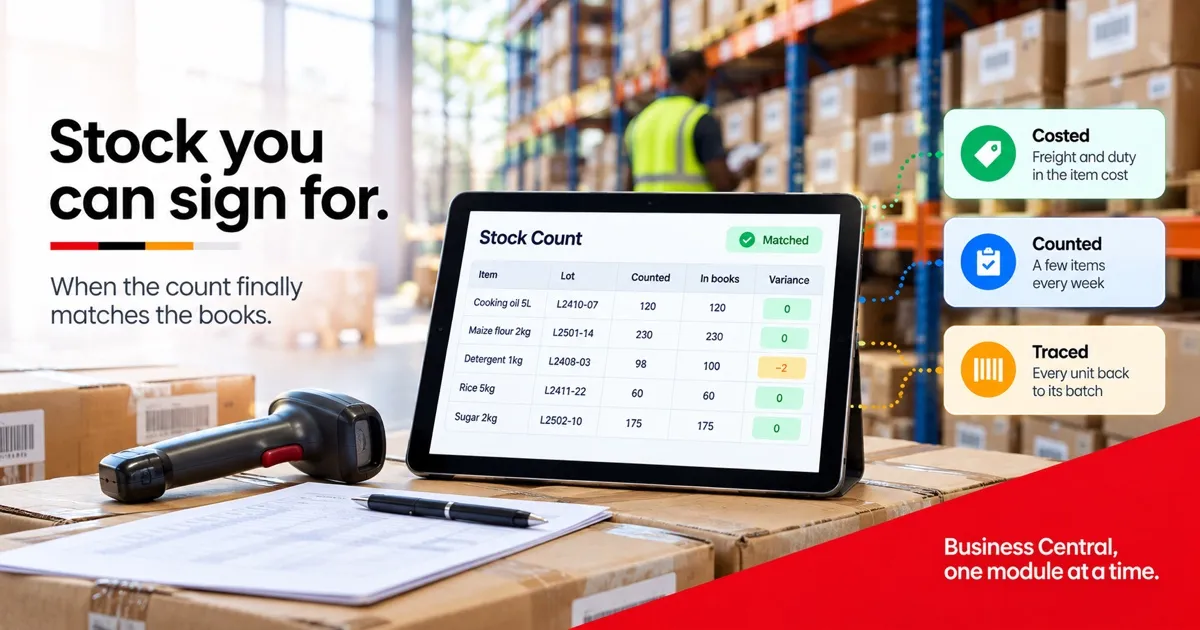
None of this is fixed by counting harder. It is fixed by four things working together: items costed correctly, a stock value that moves with every transaction, counts small enough to do every week, and the ability to trace any unit back to its batch.
In Business Central, all four are part of the Essentials licence.
1. The item card and the costing method
You need this when you can’t say, with confidence, what your best-selling item really costs you. Not yet if you carry a few dozen items and your buying prices rarely change.
Everything starts on the item card: the units of measure and how they convert, the posting groups that decide which ledger accounts the item hits, how it is replenished, and the costing method. That last setting decides how cost flows from purchase to sale, and Business Central offers five:
- FIFO and average suit most trading businesses.
- Standard suits manufacturers who want to see the difference between what a product should cost and what it did. (Production orders themselves need the Premium licence.)
- Specific suits high-value serialised goods, such as vehicles or equipment, where each unit carries its own cost.
- LIFO is in the product, but IAS 2 does not permit it, so it is not an option for a business reporting under IFRS.
Choose deliberately, item by item. Once an item has posted entries, Business Central will not let you change its costing method; the usual fix is a new item card and a stock transfer. It is one of the few set-up decisions that is genuinely hard to undo.
For importers, the cost of an item should include the freight, duty and clearing that brought it here. Business Central handles that with item charges, which we covered in last week’s article on purchasing.
2. A stock value that moves with every transaction
You need this when the store and the accounts never agree, and nobody can say why. Not yet if you hold almost no stock.
In many systems, the stock module and the ledger are two separate worlds, reconciled by hand once a month. In Business Central, every receipt, shipment, transfer and adjustment carries a value, and with automatic cost posting switched on, that value reaches the general ledger as it is posted. The inventory account is not an estimate. It is the sum of what moved.
Costs that arrive late, such as a freight bill or a supplier’s price correction, are handled by cost adjustment. It recalculates the cost of the items affected and passes the difference through to cost of sales, including for units already sold. Run it on a schedule and your margins stay honest without manual journals.
Two places then show whether the numbers agree. The Inventory Valuation report gives quantity and value by item for any date. The Inventory – G/L Reconciliation page compares the stock value with the ledger accounts and shows where they differ.
One warning. The first reconciliation after go-live will expose losses your old system was hiding. That is the system working, not failing. Agree with your auditor, before go-live, how opening differences will be treated, so the first month is a fresh start and not a crisis.
3. Counts that don’t close the business
You need this when counting stock means closing for a day. Not yet if you can count everything in an afternoon.
The annual wall-to-wall count is slow, disruptive and too late to fix anything. Business Central supports cycle counting instead. You give each item a counting period, usually by value or by how fast it moves, and the physical inventory journal (or a physical inventory order) lists what is due this week. Fast, valuable items are counted often. Slow, cheap ones are counted a few times a year.
Each count is small, so it can be done in an hour without stopping sales. The one discipline that matters: nothing moves in the items being counted until the count is entered.
Every variance is posted with a reason code. Over a few months, the pattern shows where the loss really happens: one location, one product family, one shift. That is information a year-end write-off never gives you.
4. Lot numbers, serial numbers and expiry dates
You need this when you handle food, pharmaceuticals, agro-chemicals, or anything with an expiry date or a warranty. Not yet if nothing you sell expires or is ever recalled.
Item tracking attaches a lot or serial number, and an expiry date, to stock from the moment it is received. The number travels with the stock through transfers, sales and returns. Business Central can block expired stock from being shipped, and at locations that use warehouse picks it can pick the earliest expiry first.
The real value shows when something goes wrong. If a supplier recalls a batch, the Item Tracing page shows in minutes where every unit went: which customers received it, what is still on the shelf, and what went into a finished product. For exporters of fresh produce, whose buyers ask for traceability as a condition of supply, and for anyone in food or pharmaceuticals, this is not optional.
Questions to ask any partner
Whoever implements Business Central for you, ask these before you sign:
- Which costing method do you recommend for each of our item groups, and why?
- How will you load our opening stock and opening values, and how will you treat the difference from our current books?
- How will you set counting periods for our items, and who reviews variances before they are posted?
- Can you run a recall drill on our own test data, from one supplier batch to every customer who received it?
A partner who answers these clearly has thought about your stock. One who answers with a feature list has not.
When you don’t need this
A small catalogue, one store, stable prices, and a year-end count that comes within a rounding error of the books? Then your process is working, and there is nothing here to buy.
A quick check
Take the variance list from your last stock count and sort each line into the five causes at the top of this article: units, late receipts, late costs, unrecorded movements, and counting while goods moved. Whatever is left over is the part worth worrying about.
If you would like help doing that sort, it is a 20-minute conversation with no slide deck. We will tell you honestly whether the fix is configuration, process, or neither. Write to info@trendpro.co.ke or call +254 723 343 353.
TrendPro Systems. This series covers one Business Central module at a time: what it does, when you need it, and when you don’t. Next week: order to delivery, covering pricing discipline, customer credit control and a warehouse that knows what is on the shelf.
Related in the series: One ledger, every way you report, on splitting every cost by branch, project or donor. Bank reconciliation that matches itself, on turning month-end matching into a short list of exceptions.